Work shifts, habits, and health breaks — in one app.
Screenshots and notes for timeline, habits, calendar, stats, AI assistant, work setup, and Premium.
Your day on one timeline
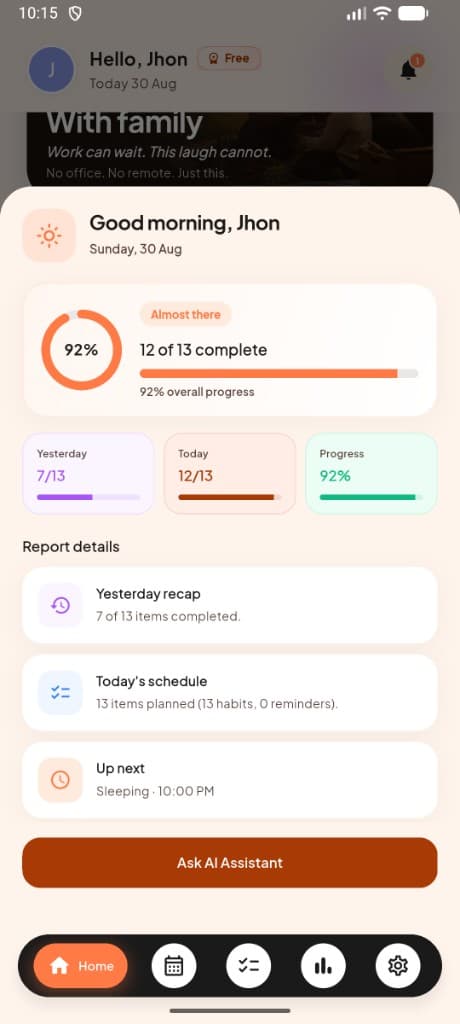
Work blocks, habits, and reminders appear in order — with today's progress and what's next on the home screen.
- ✓Home dashboard with today's status, day-off banners, and completion at a glance
- ✓Yesterday recap, today's schedule, and up-next items in one scroll
- ✓Live AI morning and evening reports tailored to your habits
- ✓92% progress rings and habit vs. reminder breakdowns without opening another screen
Habits that match your schedule
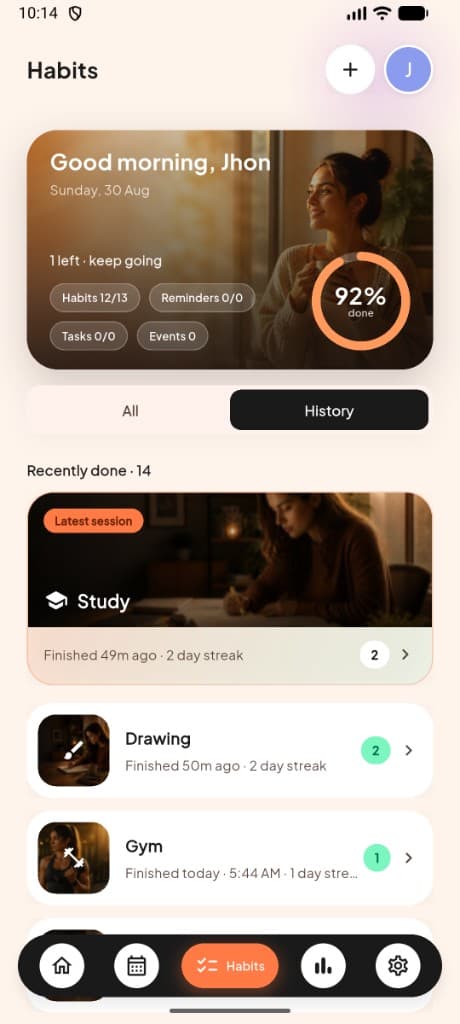
Add gym, study, running, sleep, and more — each with its own time window, reminders, and streak count.
- ✓14 habit types: Work, Personal, Health, Gym, Gaming, Focus, Errand, Yoga, Singing, Running, Sleeping, Drawing, Cycling, and Study
- ✓Daily, weekday, weekend, or custom frequency for every habit
- ✓Live sessions with Continue buttons, streak counters, and time windows
- ✓Manage, edit, delete, and track history with All and History tabs
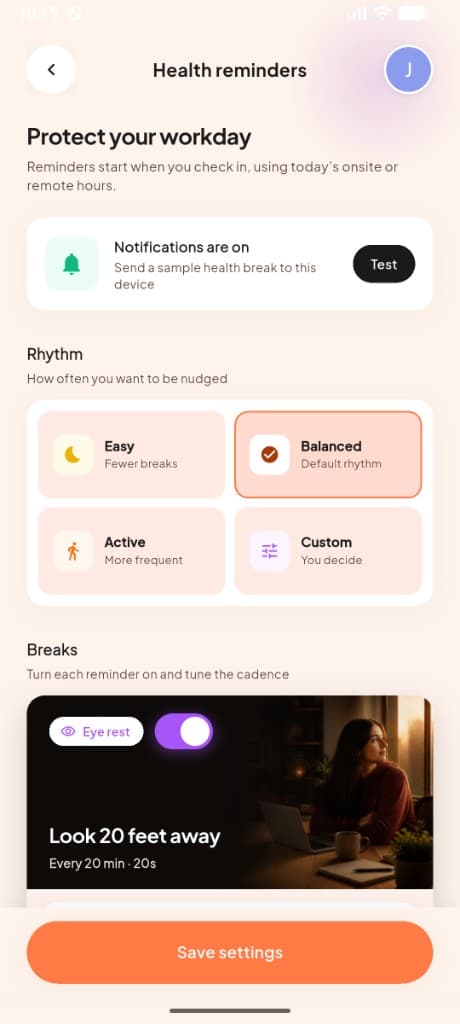
Breaks timed to your shift
Eye rest, walks, water, and movement prompts show up after you check in — snooze or skip any of them.
- ✓Eye rest, movement, walking, water, and work-finished reminders
- ✓Health breaks on home, tied to your check-in and work hours
- ✓Easy, Balanced, Active, or Custom rhythm presets
- ✓Turn each break on or off and tune the cadence individually
Ask questions about your week
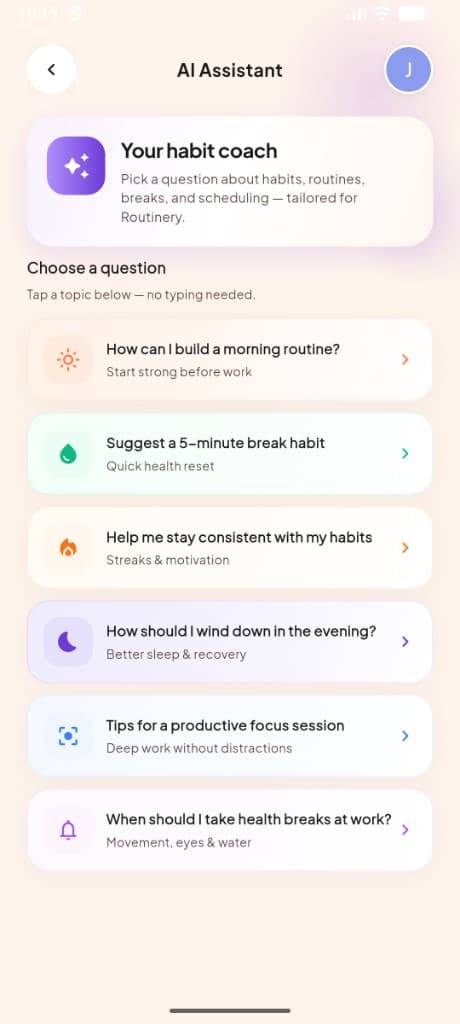
Tap a topic — morning routine, focus, consistency — or open the daily report to compare yesterday with today.
- ✓Tap-to-ask prompts for morning routines, focus sessions, and consistency
- ✓Daily report cards with yesterday vs. today stats and what's up next
- ✓One-tap Ask AI Assistant from your daily progress screen
- ✓Session coach with tailored tips for each habit type
See what you finished — and what slipped
Day, week, and month views show completion rates, streaks, and which categories you miss most often.
- ✓Day, week, and month views with average completion rings
- ✓Perfect days, remaining items, and streak counters at a glance
- ✓Per-category breakdowns for habits, reminders, tasks, and events
- ✓Activity detail cards showing completed vs. missed for each category
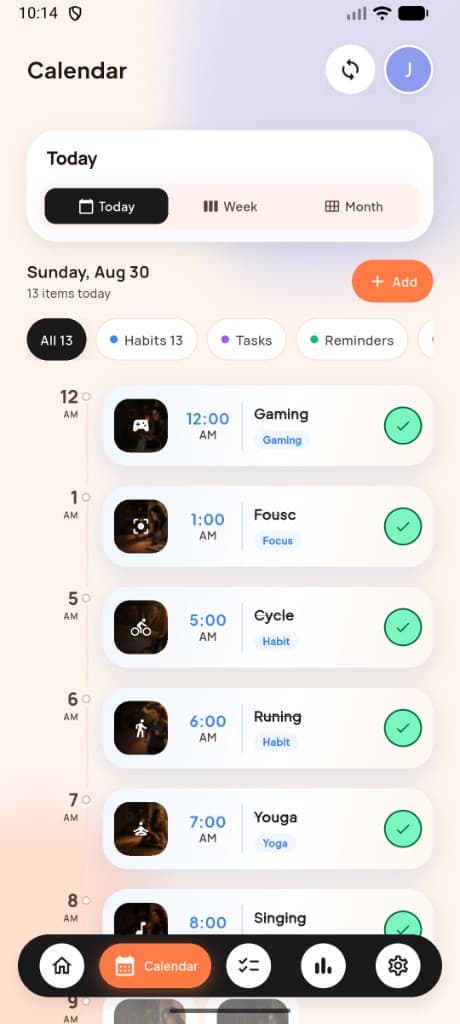
Month, week, or today view
Blue dots mark busy days. Tap any date to open its full list of habits, tasks, and meetings.
- ✓Today, week, and month views switchable in one tap
- ✓Blue dots on dates with scheduled items; tap any day for its timeline
- ✓Filter by All, Habits, Tasks, or Reminders with live counts
- ✓Add items from the calendar and mark them complete inline
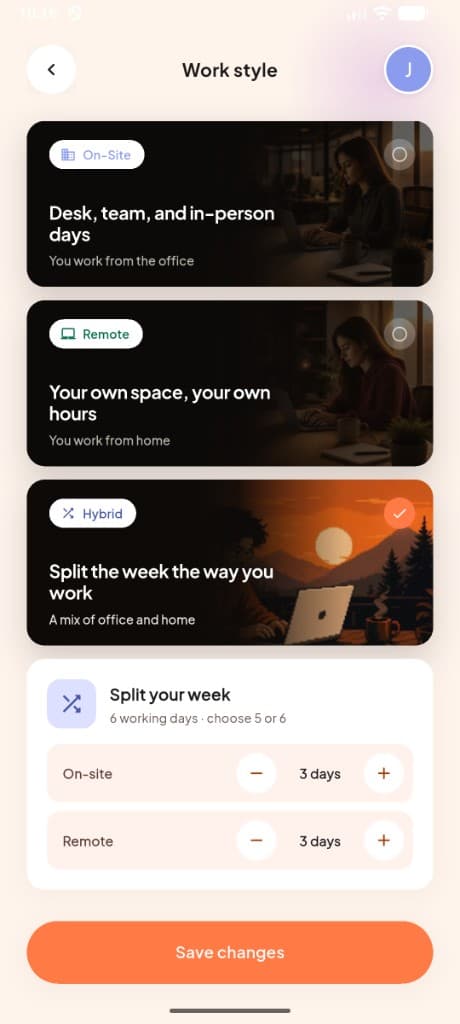
On-site, remote, or hybrid
Pick how you work and split office vs. home days. Your check-in screen and reminders follow that setup.
- ✓Choose On-Site, Remote, or Hybrid with photo-backed cards
- ✓Hybrid mode lets you split office and remote days across the week
- ✓Stepper controls to set exactly how many on-site vs. remote days
- ✓Saved to your profile and reflected across check-in and reminders
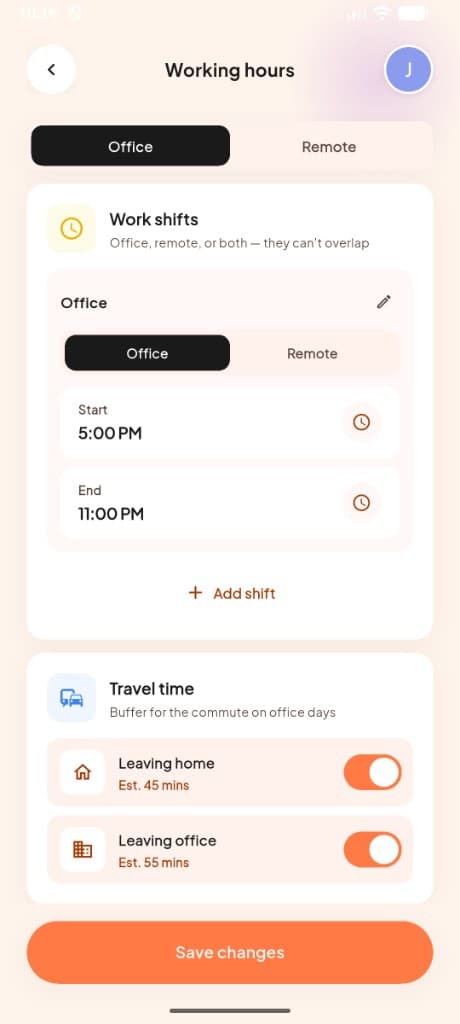
Office and remote shifts
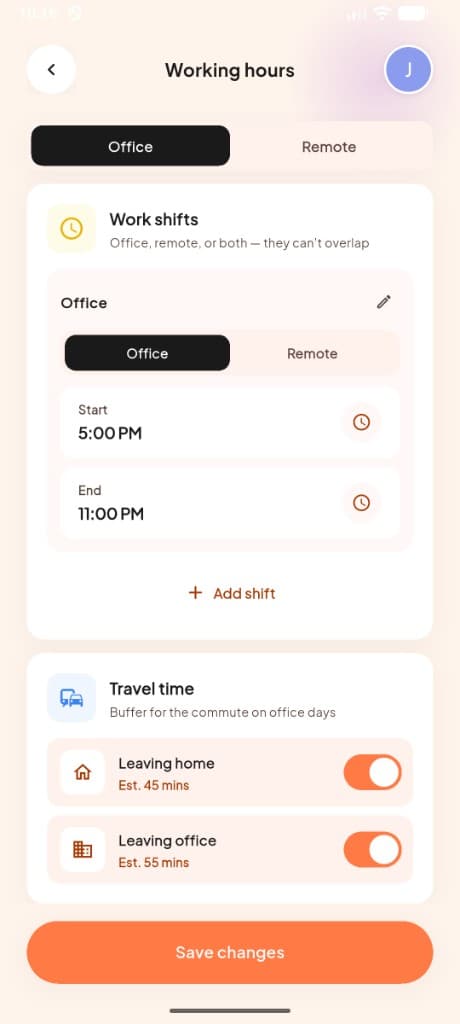
Set start and end times for each shift, add travel buffers, and let health reminders run only while you're checked in.
- ✓Separate Office and Remote tabs with independent shift settings
- ✓Add multiple shifts per day — they can't overlap
- ✓Travel time toggles for leaving home and leaving office with estimates
- ✓Health reminders start when you check in, using today's hours
Sign in with fingerprint or Face ID
Optional biometric login when reopening the app. Password is still required on a new device.
- ✓Biometric unlock when reopening the app on a trusted device
- ✓Password still required when signing in on a new device
- ✓Clear how-it-works steps so you know exactly what's protected
- ✓Turn it on or off anytime from Settings → Fingerprint login
Sign up, sign in, and get started fast
Secure account creation with email or social login, guided onboarding, and biometric protection when you're back.
Email sign up & login
Create an account with email and password, verify your address, and sign in from any device.
Google & Apple sign-in
One-tap login with Google or Apple — no extra passwords to remember.
Password reset
Forgot password flow with OTP verification and a secure reset screen.
Onboarding
Full-bleed intro slides that walk new users through what MeRhythm AI does before sign-up.
Biometric unlock
Fingerprint or face unlock on app open, plus optional fingerprint login in settings.
Profile setup
Multi-step setup: profile details, work style, and working hours before you hit the dashboard.
Built for on-site, remote, and hybrid days
Configure how you work, check in when your day starts, and review a shift report when it ends.
Work styles
Choose On-Site, Remote, or Hybrid — each with its own schedule and reminder behavior.
- Office days
- Remote days
- Split-week hybrid
Working hours
Set per-day shifts with start and end times. Hybrid users configure separate office and remote hours.
Daily check-in
Check in for office or remote work from the home screen. Handles off-days and on-leave states.
Shift report
End-of-day summary covering attendance, health breaks, and how your shift went.
Work shifts card
Profile view of your office and remote shifts — they can't overlap, so your schedule stays clean.
Go beyond checkboxes with live sessions
Certain habits open a full-screen guided experience — timers, GPS, coaching, and history included.
Running
GPS-tracked runs with route map preview, location access, and outdoor history.
Cycling
Outdoor ride sessions with duration tracking and session history.
Focus
Dedicated focus timer session to protect deep work blocks.
Study
Study sessions with topic input and AI-generated study guides.
Yoga
Guided yoga session with themed UI and session tracking.
Sleep
Night-sky sleep session with moon timer, live view, and sleep history with stats.
Mood sessions
Themed sessions for work, personal, health, gym, gaming, drawing, and singing habits.
Breaks and nudges that match your workday
Health reminders start when you check in and follow your on-site or remote hours for the day.
Eye rest (20-20-20)
Configurable interval and duration for screen breaks during work.
Walking breaks
Scheduled walk reminders with a built-in walk timer and activity tracking.
Water reminders
Hydration nudges with customizable amounts throughout the day.
Movement breaks
Short movement prompts to keep you active between desk sessions.
Work finished
Wrap-up reminder when your shift ends so you can close the day cleanly.
Health reminder settings
Fine-tune every reminder type from Settings → Health reminders.
Find anything and stay on top of your day
Global search, a notification inbox, and calendar tools keep work, habits, and alerts in one place.
Global search
Search habits, calendar events, and app pages. Quick shortcuts to create habits, calendar, and profile.
Notification inbox
In-app alerts with filters for All, Habits, Health, Work, and Challenges.
Calendar tasks
Add tasks and reminders to any day. View them alongside habits on the timeline.
Google Calendar sync
Pull events from Google Calendar so meetings appear next to your habits.
Schedule conflict detection
Get warned when a new habit overlaps an existing block on your calendar.
Help, policies, and contact
Everything you need to learn about MeRhythm AI, get in touch, or understand how your data is handled.
About
Learn about MeRhythm AI and the team behind the app.
Contact us
Reach out with questions, feedback, or support requests.
Privacy policy
How we collect, use, and protect your data.
Terms of service
Usage terms and conditions for MeRhythm AI.
Common questions
Something still unclear? Email us — a real person reads it.
Yes — during setup you choose On-Site, Remote, or Hybrid, and for Hybrid you can split your week and set separate hours for office and home days.
You can create habits for Work, Personal, Health, Gym, Gaming, Focus, Errands, Yoga, Singing, Running, Sleeping, Drawing, Cycling, and Study. Running, cycling, focus, study, yoga, sleep, and mood habits open guided live sessions with timers, GPS, or coaching.
Yes. The AI assistant is fully optional — your timeline, habits, and reminders keep working exactly the same without it.
Reminders for eye rest, walking, water, movement, and work wrap-up start when you check in for the day. They follow your on-site or remote hours and can be snoozed or skipped from the home screen.
Yes. Google Calendar sync is available so meetings appear alongside your habits and tasks. You can also add tasks and reminders directly in the app.
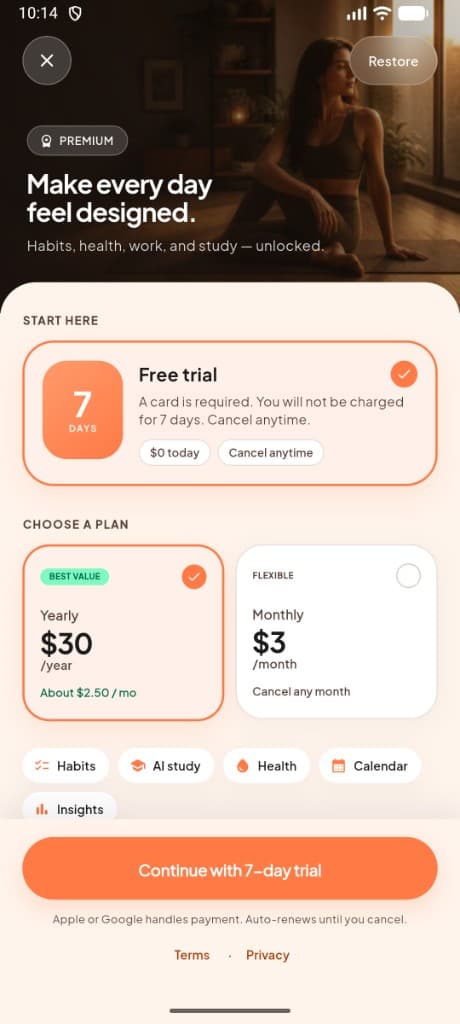
Premium includes every feature. Start with a 7-day free trial, then pick monthly or yearly billing in Settings.
Everything is permanently removed within 30 days. See our Privacy Policy for full details on data handling and retention.
Download and try it on your schedule
7-day free trial, then $3/month or $30/year inside the app.